Mostrando entradas con la etiqueta vulnerabilities. Mostrar todas las entradas

viernes, 10 de abril de 2020

Spyse Recognition - Cybersecurity Tool

Today there are many recognition tools, but let me introduce one that I use today to discover some types of attacks that I will discuss below.

Information about a domain

There are many vulnerabilities and techniques about a domain and I will show you below:

1.- Enter https://spyse.com/user/registration

2.- Create an account and log in

SPF not established

Sample report: https://hackerone.com/reports/120
With spyse.com this type of attack is easily detectable only by performing the steps below:

1.- Enter spyse.com with your valid credentials
2.- Enter the domain you want to verify, example: twitter.com


3.- Now go to the navigation where it says TXT records if it shows nothing it is vulnerable

Note: in this case twitter includes your spf record: v= spf1 ip4: 199.16.156.0/22 ...


In simple steps you can recognize this vulnerability with which an attacker can perform phishing and that emails reach their inbox.

List subdomains in search of Subdomain Takeover

report example: https://hackerone.com/reports/661751
With spyse.com this type of attack is easily detectable, we only carry out the following steps:

1.- Enter spyse.com with your valid credentials
2.- Enter the domain you want to verify, example: twitter.com

3.- in the navigation bar click subdomain list

4.- check the cname of each site
5.- enter each site and if it responds incorrectly and has a cname associated it may be a possible takeover subdomain
6.- You can consult a list of services that allow this attack: https://github.com/EdOverflow/can-i-take-over-xyz


So with spyse we can see the subdomains and find subdomain takeover. In this case of twitter there is none.


Missing security headers

Missing security headings can lead to higher risks sometimes they are reported, some sample reports can be found here:

https://hackerone.com/reports/64645
https://hackerone.com/reports/163676
https://hackerone.com/reports/17239
https://hackerone.com/reports/231805

To review these settings it is possible to use spyse.com by performing the following steps:

1.- Enter spyse.com with your valid credentials
2.- Enter the domain you want to verify, example: twitter.com

3.- In the navigation bar click on common info
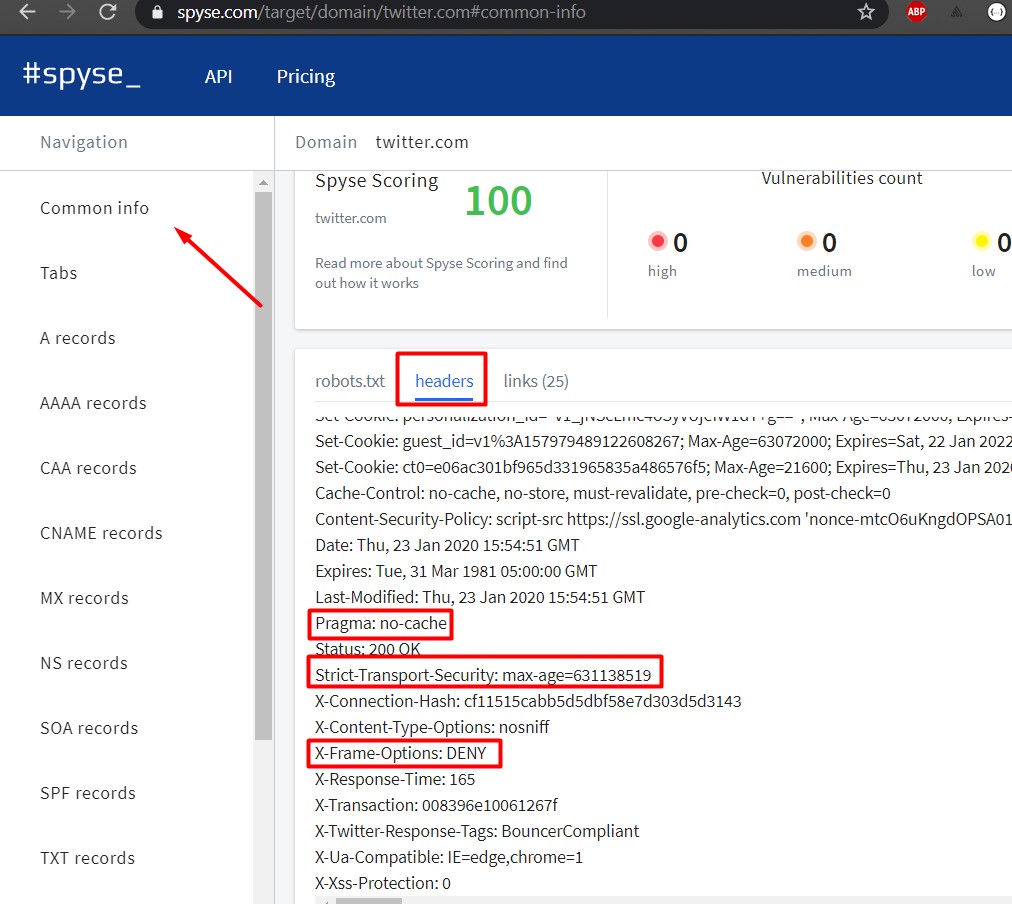
4.- click on headers
5.- Check that there is no need for a security heading such as the one in the example reports:


  • X-Frame-Options
  • Content-Security-Policy
  • Strict-Transport-Security
  • Cache-Control
  • Pragma


if one is missing it is vulnerable. Although this is a practical improvement so that they cannot reach attacks on the browser side, it is useful to implement security on them.


Detect domains or subdomains with the same IP (within the same server)

Many times the main applications are not vulnerable to some type of common attack such as: XSS, SQLi, IDOR, RCE, etc.
This does not mean that privileges cannot be elevated on the server using a subdomain or domain within the same server, gaining access to the main website. It is also possible to find the real IP of the server if it uses any WAF to avoid it.

Sample report: https://hackerone.com/reports/315838

For this it is possible to detect with spyse which domains or subdomains are within the same server. Take the steps below to detect them:

1.- Enter spyse.com with your valid credentials
2.- Enter the domain you want to verify, example: twitter.com

3.- In the navigation bar click on Domains in same IP


4.- Find if it is possible to find vulnerabilities in this Host or if it finds the real IP of the host in the DNS that points to A

Vulnerability counter

Depending on the technologies used, it is possible to detect if the host has vulnerabilities and depending on it it shows you the criticality.

To test this on spyse.com just follow the steps below:

1.- Enter spyse.com with your valid credentials
2.- Enter the domain you want to verify, example: testphp.vulnweb.com


3.- Check the vulnerability counter.


Lastly, that is not all you can do with spyse, you can also find information such as: the robots.txt file which contains important information such as links or hidden features, there is also a links section to see indexed links, and you can see ASN or Organizations listing different servers from the same organization which widens the scope for an ethical hacker.

Also if you are one of those who like captures for each subdomain with spyse it is possible to automate this and more using the API.

And if it were not all it includes an API with which you could automate this whole process from your server by running a cronjob in search of information or automated recognition with spyse.

An example of using the api can be the following:

curl -X GET "https://api.spyse.com/v2/data/domain?limit=100&name=twitter.com" -H "accept: application / json" -H "Authorization: Bearer xxx-xxx-xxx- xxx-xxxx "| jq


parsing this information can be very useful for automated collection.


Without further ado I recommend registering and buying a subscription on spyse.com (https://spyse.com/user/subscription) with which security consultants, security companies or bug hunters could take full advantage.

jueves, 22 de noviembre de 2018

Node JS: Seguridad y Explotacion

Introducción

Node.js es un entorno en tiempo de ejecución multiplataforma, de código abierto, para la capa del servidor basado en el lenguaje de programación ECMAScript, asíncrono, con I/O de datos en una arquitectura orientada a eventos y basado en el motor V8 de Google.

Material:

https://github.com/ajinabraham/Node.Js-Security-Course

Les dejo el siguiente enlace es lo que necesitamos para hacer pruebas de nuestras explotaciones.

Descargar node js: https://nodejs.org/es/download/

Clonamos el repositorio utilizando git: 
git clone https://github.com/ajinabraham/Node.Js-Security-Course.git

Accedemos a la carpeta desde el cmd o terminal.

Explotación

* Alcance de Variables


Tenemos el siguiente código del archivo global_scope.js, en este ejemplo estamos utilizando un framework llamado express que simplifica mucho el trabajo, para instalar express utilizamos el siguiente comando:

npm install express <- Esto hace que se instale el modulo express

node global_scope.js <- Esto ejecuta el archivo para el servidor node


Ahora el problema reside en que si accedemos desde el navegador por ejemplo chrome se muestra la siguiente pantalla:


Lo cual es normal, si accediéremos esta variable aumentaría lo cual esta bien, pero lo que pasa aquí es que si accedemos desde otro navegador, otra pc este archivo como esta en solo en el mismo archivo ejecutándose siempre en node va seguir y seguir en aumento lo cual esta mal. Desde firefox se mira asi:


* HTTP Parameter Pollution

El duplicar algunas variables aveces hace que el lenguaje de programación tome la primera ocurrencia de la misma, la ultima o ambas, en el caso de NodeJs toma todas. Esto nos da paso a diferentes tipos de evasión ante algunos firewalls o múltiples tipos de ataque en diferentes variables que son aceptadas por NodeJS.


Tenemos el siguiente código hpp.js, el cual hace una petición y muestra la variable id en el body asi como en consola. El problema reside cuando ejecutamos varias veces las variables, NodeJs toma todas las variables que le enviemos:


* Funcion eval()  - RCE (Remote Code Execution)

Como su palabra lo dice eval() evalúa un código, esto puede ser muy peligroso ya que podemos matar el proceso ejecutándose osea el servidor mismo ya que es un solo archivo, realizar un Dos al navegador, etc. Otras funciones igual de peligrosas son:

 - setInterval(codigo,2)
 - setTimeOut(codigo,2)
 - new Function(codigo)


En este ejemplo tenemos el siguiente código eval.js, el cual lo que hace es que toma una variable name y esta misma la evalua. Por ejemplo:


Vemos como se imprime un hola en consola, esto esta evaluando nuestro código nodejs, podríamos ejecutar algo mas peligroso como cerrar el proceso del servidor:

Que es lo mas peligroso que podríamos llegar hacer? un RCE podemos ejecutar comandos del sistema con el simple echo de crear un reverse, en este ejemplo utilizamos el generador en python esto hace que la cadena que nos genere la interprete en una sola linea codificada:


Generamos el vector de ataque usando: 
python nodejsshell.py 127.0.0.1 666

donde 127.0.0.1 es la ip que esta a la escucha
y 666 es el puerto


Usamos:
nc -lvp 666
Para poner el puerto 666 a la escucha de todas las conexiones entrantes.

Aquí vemos como realizamos la conexión reversa efectivamente. El script en python esta realizado especialmente para una terminal de linux por lo que les recomiendo utilizar una terminal a la escucha usando netcat o instalar terminal de ubuntu si tienen windows 10 desde la tienda de windows.

* Entradas no validadas o verificadas

Al no validar las entradas en la aplicación web puede llegar a tener muchas de las vulnerabilidades que tienen las aplicaciones web comunes tal y como es: SQL Injection (En mongoDB es mas común en nodejs), XSS, LFI, SSRF, IDOR en el blog están varias entradas sobre este tipo de ataques ya que es muy común poder encontrarlas, les recomiendo usar el buscador y pegarles una leída y normalmente se encuentran en el top 10 de owasp. Veremos alguna de ellas:

XSS

Gracias a un XSS podemos inyectar codigo javascript dentro de la pagina.

Tenemos el siguiente archivo simple_server.js el cual contiene una variable name la cual es mostrada en el body de la pagina. Aquí tenemos un claro caso de un XSS reflejado. 


LFI

Con LFI podemos encontrar archivos dentro del servidor locales, asi como intentar escalar privilegios.


El archivo es el siguiente dir_trasversal.js el cual pide un archivo dentro de la variable load, para cargarlo y mostrarlo en la pagina web.


* Ataque Denegacion de servicio en Expresiones Regulares

Uno de los ataques mas comunes puede llegar a suceder en NodeJS es que usando alguna entrada grande puedes causar un buffer overflow y hacer que el servidor caiga, realizando fuzzing o ataques brute force en aplicaciones NodeJS también puedes lograr una caída del server.


En este caso tenemos el siguiente archivo redos.js el cual contiene un parámetro email el cual es validado por una expresión regular que en realidad sea un email.


En el siguiente ejemplo ponemos un email valido y nos arroja un tiempo rápido de validación, pero si realizamos un ataque buffer overflow agregando demasiados caracteres para que la pila se desborde causa un Dos en el servidor, esto también sucede cuando el servidor recibe muchas peticiones con múltiples threads como un dirbuster, dirsearch o brute force.

* Information Disclousure

Esto es importante ya que nos ayuda a encontrar otros posibles ataques, es muy comun en la fase de reconocimiento.

 - Cabeceras
 - Cookies por defecto
 - Paginas de Error


* Seguridad en las cabeceras

La seguridad en las cabeceras nos ayudan para saber si la aplicación permite CORS, si podemos ver las cookies en un alert, si podemos ejecutar javascript usando xss, etc. Las cabeceras pueden a llegar un aliado en nuestra aplicación si están bien configuradas.

https://securityheaders.com/

Puedes checar las cabeceras inseguras desde esta pagina.
como protección en NodeJS puedes utilizar la librería de helmet: https://github.com/helmetjs/helmet

Revisando el código caja blanca

Por ultimo si tienes el codigo puedes realizar un escaneo usando NodeJS Scan: https://github.com/ajinabraham/NodeJsScan

El cual es gratuito y muy completo, para realizar esta tarea automatizada.